
 Tor v3
 @FVPNS

 82822222
 EN
EN RU
RU


Настройка OpenConnect для Linux(Debian, Ububntu)
Настройка OpenConnect для Linux(Debian, Ububntu)
- apt-get update
- apt-get install openconnect network-manager-openconnect network-manager-openconnect-gnome
- далее необходимо сгенерировать подписку и получить креды для подклюения

- далее открываем консоль, заходим под root
echo jHjoqei0 | openconnect --user=34251 --passwd-on-stdin -b https://lv.specialsseason.com/?admin- пароль можно передать через echo ввести как на примере выше, далее пайплайн и после пайплайн данныя для подлключения
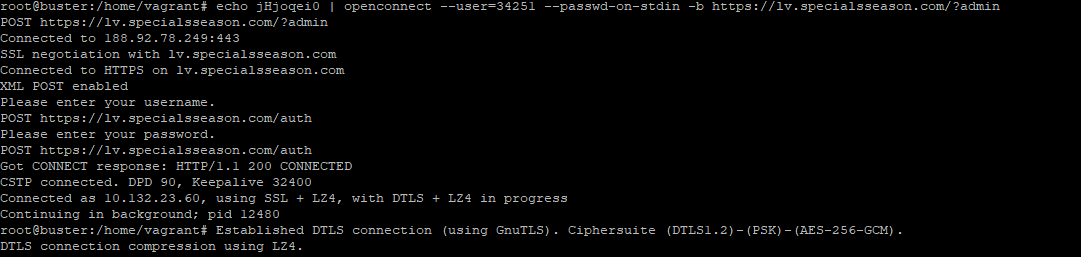
- подклюение работает, проверить можно командой
ip a sh 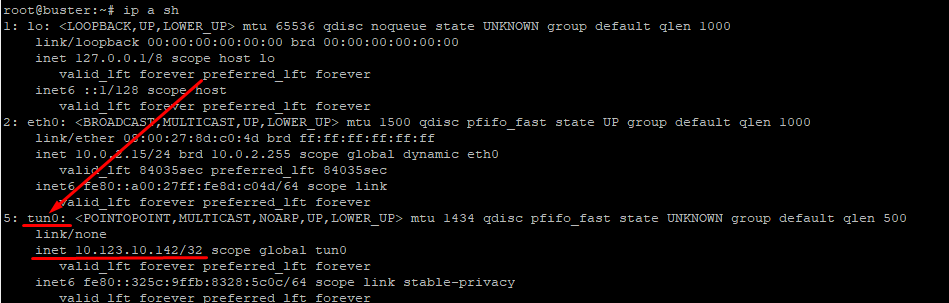
- чтобы завершить подключение необходить сделать
ps -aux | grep openconnect 
- kill 2285 openconnect Завершен.
Для nlall.specialsseason.com и deall.specialsseason.com
ниже пример команд, для опции --authgroup необходимо выбрать жалемый маршрут из списка ниже
echo aUy2Tjf0 | openconnect --authgroup=NL-LU --user=36668 --passwd-on-stdin -b https://nlall.specialsseason.com/
Group: [NL-SE|NL-SP|NL-TR|NL-SG|NL-RS|NL-AU|NL-RU4|NL-CY|NL-US|NL-LU|NL-NL|NL-FR|NL-AT|NL-CA|NL-LV|NL-DE|NL-BE|NL-US2|NL-US3|33|NL-HK|NL-IM|NL-IT|NL-FI|NL-RU2|NL-UA|NL-PL|NL-RU|NL-CH|NL-RU3|NL-GB|NL-MD|NL-PA|NL-RO]