
 Tor v3
 @FVPNS

 82822222
 EN
EN RU
RU


Настройка VPN для Windows: Hiddify + Vless ключ
VPN для Windows на базе прокси-клиента Hiddify и протокола Vless предоставляет высокий уровень безопасности и конфиденциальности при работе в интернете.
В этом руководстве мы пошагово рассмотрим, как настроить комбинацию «Hiddify + Vless» на Windows в качестве VPN для обеспечения надежного и безопасного подключения к глобальной сети.
Что такое Hiddify и Vless? Hiddify — это кроссплатформенный прокси-клиент, доступный на Android, Windows, Linux и macOS.
Приложение поддерживает широкий спектр протоколов, включая Vless, Vmess, Reality, TUIC, Hysteria, WireGuard, SSH и другие, обеспечивая безопасный и конфиденциальный доступ к Интернет-ресурсам.
Vless — это легковесный и гибкий сетевой протокол, разработанный для прокси-серверов и VPN. Он обеспечивает высокую производительность, минимальные задержки, поддерживает различные транспортные протоколы (TCP, mKCP, QUIC) и фокусируется на упрощенной аутентификации без сложного шифрования, что увеличивает скорость и снижает вычислительные затраты.
Vless популярен благодаря своей надежности, гибкости и совместимости с различными системами.
Ключ Vless Для настройки VPN-соединение в Windows на базе приложения Hiddify и протокола Vless, потребуется ключ доступа к прокси-серверу.
Скачать Hiddify и установить на комьютер.
Так же ссылка на GitHub
Формат ключа Vless Ключ протокола Vless содержит несколько обязательных и опциональных параметров, которые определяют настройки подключения к прокси-серверу.
Vless-ключ обычно имеет следующий формат:
На странице подписки в Лично кабинете пользотеля
необходимо вырбрать VLessTCPReality и выбрать способ оплаты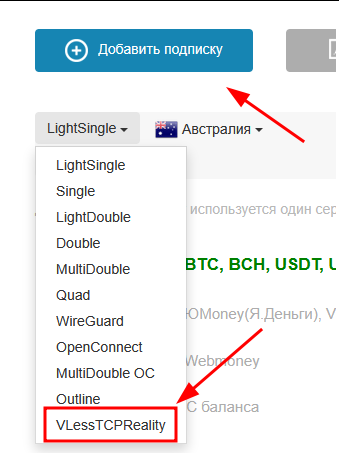
После оплаты будет доступно две опции, необходимо выбрать следующую, single click мыши копирует в буфер обмена.
Пример ключа VLess копируэмый в буфер обмена:
vless://[email protected]:443?encryption=none&fp=chrome&pbk=4DUFhIsTtQLD3go3AhdVy3AZVl8KKyJ3diOdMQMOO3M&security=reality&sid=835208&sni=www.google.com&spx=%2FzReU79X5Ni586YL&type=tcp#[email protected]
после установки Hiddify необходимо добавить ключ в профиль

далее Добавить ключ из буфера обмена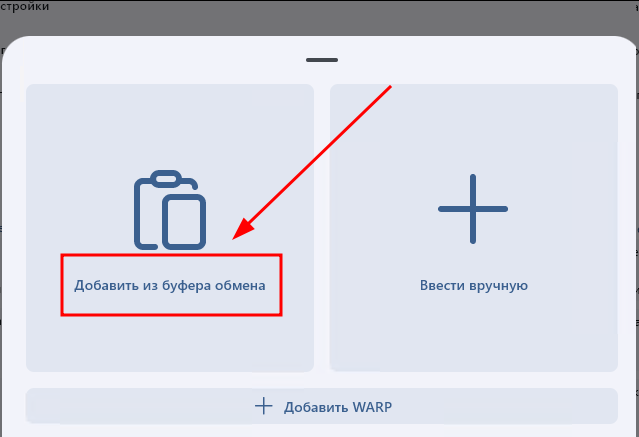
Далее вид следующий, ID необходим для передачи в сапорт в случае возникновения проблем.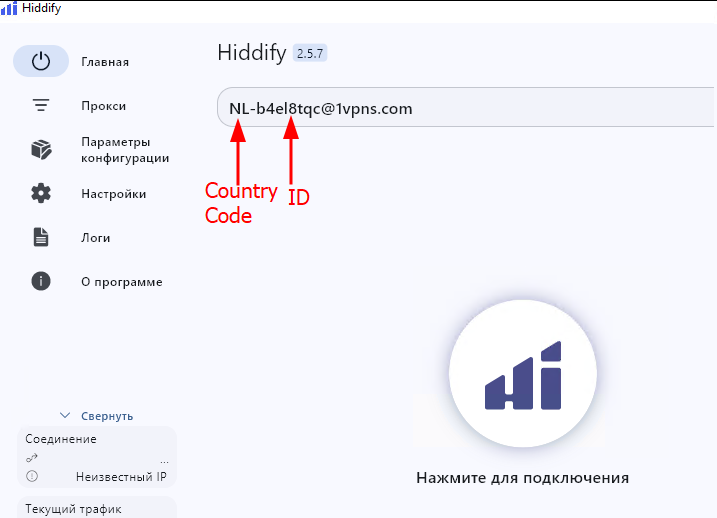
Далее необходимо нажать кнопку для подключения
Также можно посмотреть логи подключения
После успешного подключения по default работает только прокси режим, если нужно подключиться как тип vpn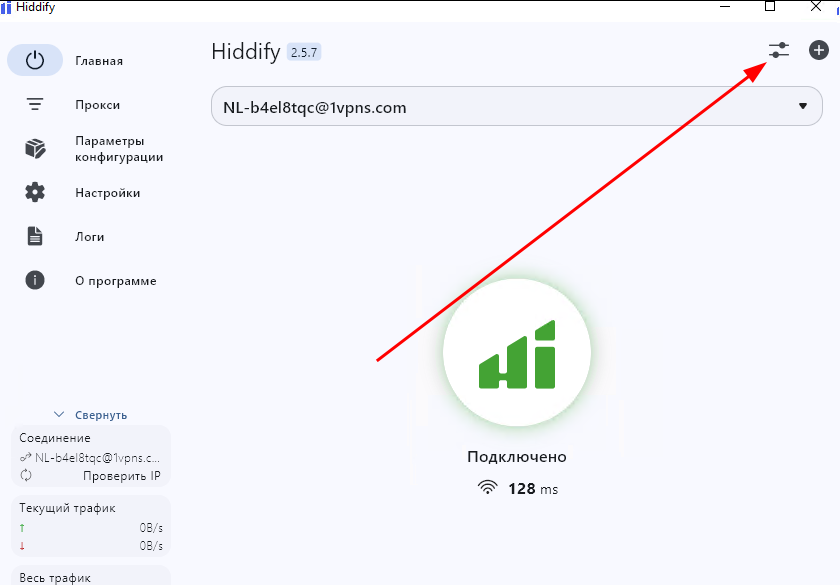
и переключить в VPN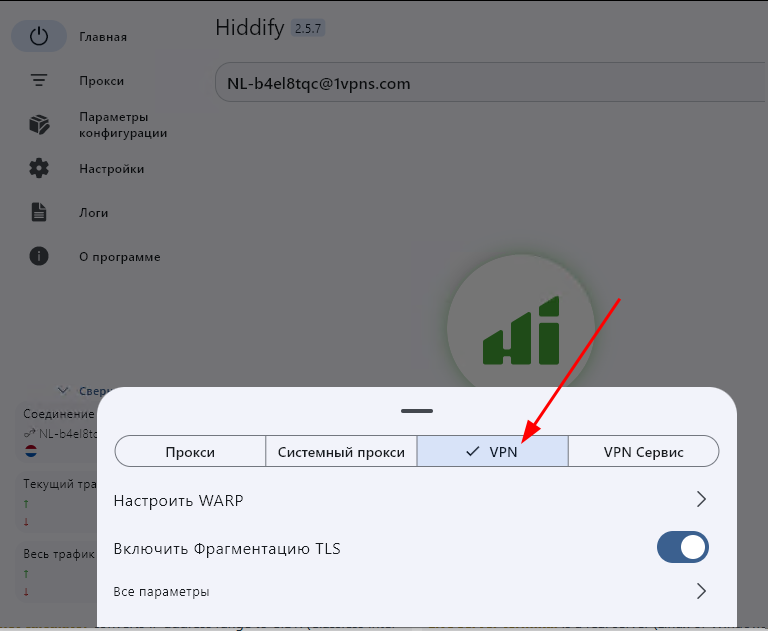
в таком режиме весь трафик будет перенаправляться через VLess
Можно выбрать необходимый для себя режим работы.
Приятно пользования.